Understanding Game Crosshairs and HUD Elements: Purpose, Design, and Digital Relevance
In the world of video games, especially first-person shooters (FPS) and action titles, the game crosshair is more than just a simple aiming tool. It's a crucial HUD (Heads-Up Display) element that enhances gameplay, guides player actions, and improves overall performance. Whether you're a casual gamer or a competitive player, understanding the role and design of crosshairs can deepen your appreciation of game mechanics and improve your in-game accuracy.
What Is a Game Crosshair?
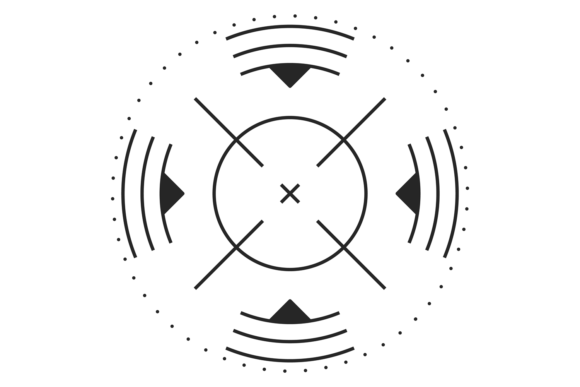
A game crosshair is a visual indicator on the screen that shows where a weapon will fire or where the player is aiming. It typically appears as a small set of intersecting lines, dots, or shapes centered on the screen. This element is a part of the larger HUD system, which includes health bars, ammo counters, minimaps, and other real-time information.
Crosshairs can vary widely between games. Some are minimalistic and barely noticeable, while others change dynamically based on movement, reload status, or weapon type. Their design is intentional, balancing visibility and immersion to ensure players can focus on gameplay without being distracted.
The Role of HUD Elements in Gaming
HUD elements like the crosshair are essential for delivering critical information without pulling players out of the game environment. They help maintain situational awareness—a key factor in fast-paced games where every second counts.
- Crosshair: Aids in aiming and target acquisition.
- Health indicators: Show player status and damage taken.
- Mini-map: Provides spatial awareness and enemy locations.
- Ammo counter: Helps manage resources during combat.
Together, these components form a cohesive interface that supports player decision-making and enhances the overall gaming experience.
Designing the Perfect Crosshair
Designing an effective crosshair involves more than just picking a style. It requires balancing aesthetics, functionality, and player preference. Many modern games allow players to customize their crosshair color, size, thickness, and shape to suit their playstyle and visual comfort.
For example, some players prefer a thin, static crosshair for precision aiming, while others may opt for a dynamic crosshair that expands when moving to indicate reduced accuracy. These design choices can significantly impact gameplay performance and user experience.
Common Crosshair Styles
- Classic Cross: Traditional intersecting lines, often used in older FPS titles.
- Dot-Based: A central dot with optional outer rings for alignment.
- Dynamic: Adjusts size or shape based on in-game actions like movement or zooming.
- Minimalist: Designed to be subtle and non-intrusive, often favored by competitive players.
Technical Screens and Crosshair Isolation
For developers, designers, and content creators, having access to isolated crosshair images—such as those marked on a white background in EPS, JPG, SVG, or transparent PNG formats—is essential. These files are used in a variety of contexts:
- Game development: To test HUD layouts and ensure visibility across different environments.
- Marketing and promotion: For use in trailers, posters, and social media graphics.
- Educational content: To illustrate design principles in game development tutorials.
- UI/UX testing: To evaluate the usability and aesthetics of crosshair designs.
These technical screen marks allow for precise manipulation and integration into various digital projects. SVG and transparent PNG formats are especially valuable due to their scalability and background flexibility, making them ideal for both print and digital use.
Why Crosshair Design Matters in Competitive Gaming
In competitive gaming, even the smallest details can influence performance. A well-designed crosshair can improve target acquisition speed, reduce eye strain, and enhance aiming consistency. Many professional players tweak their crosshair settings to match their personal preferences and in-game conditions.
For instance, in games like Counter-Strike: Global Offensive or Valorant, players often use custom crosshair codes to replicate the exact look and behavior of their preferred setup. These settings can be shared across communities, contributing to a culture of customization and optimization.
Common Misconceptions About Crosshairs
Despite their ubiquity, there are several misconceptions about crosshairs that persist among players:
- Myth: A bigger crosshair always means better visibility.
- Reality: Larger crosshairs can obscure targets and reduce precision, especially at long range.
- Myth: Crosshair color doesn't affect gameplay.
- Reality: Colors like red or green may blend with environments, making them harder to see during intense action.
Understanding these nuances helps players make informed decisions when customizing their HUD elements.
Crosshairs Beyond Gaming: Broader Technological Influence
The concept of the crosshair extends beyond gaming. It's commonly used in various digital interfaces and tools, including:
- Graphic design software: To align elements precisely on a canvas.
- Photography and video editing: For framing shots and tracking movement.
- Medical imaging: To highlight specific areas of interest in scans and X-rays.
- Augmented reality (AR): To guide user interaction within immersive environments.
This cross-industry application underscores the crosshair's versatility and enduring relevance in modern technology.
Conclusion: The Crosshair’s Impact on Gaming and Design
From its humble beginnings as a simple aiming aid to its current status as a customizable, dynamic HUD element, the game crosshair has evolved significantly. It plays a pivotal role in enhancing gameplay, supporting player performance, and contributing to the broader design of digital interfaces.
Whether you're designing a game, creating promotional materials, or fine-tuning your in-game settings, understanding the importance of crosshair design and its technical representation—such as isolated EPS, JPG, SVG, or transparent PNG files—can make a big difference in both function and aesthetics.
As technology continues to advance, we can expect even more innovative uses of crosshairs and HUD elements, not only in gaming but across a wide range of digital experiences that shape how we interact with the virtual and real worlds.